Filters
Chart Function
What is the purpose of your visualization?
Data Scales
What types of data are you working with?
Color Palette
Do categories convey negative or positive connotations?
 Ripple
core guidelines
Data visualization in Ripple transforms information into insight. These guidelines help teams design visual stories that empower higher education users to make informed, data-driven decisions.
To effectively create meaningful visualizations, it's essential to grasp the concept of data visualization and its significance to Watermark. Understanding this is crucial for leveraging Watermark's capabilities to enhance decision-making and communication.
"There is no such thing as information overload. There is only bad design."
Edward Tufte, American data visualization designer and professor
Effective data visualization takes data and context into consideration, organizing and translating it to tell a story. Data visualizations are powerful tools in the problem-solving toolbox, enabling the breakdown of large and complex data sets and concepts into more manageable and understandable components.
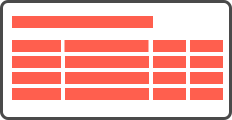

Every Ripple visualization should bridge the gap between data understanding and human action. Leaders in higher education use these visualizations to gauge progress, make informed decisions, and share institutional narratives.
| Goal | Outcome |
|---|---|
| Track performance of departments over time | Identify low-engagement areas |
| Monitor completion of program reviews | Highlight milestones |
| Compare outcome results across terms | Identify under-performing outcomes |
Follow these guidelines to select the most effective visualization.
Learn about our core Principles for creating data visualizations. These guidelines help make our visualizations meaningful by ensuring they are accurate, accessible, and actionable.
Learn about the four common Data Scales: nominal, ordinal, interval, and ratio to understand the ways data visualizations present data.
With an understanding of our principles and data scales, you can now utilize our Framework to select the ideal chart and color palette that effectively conveys your story.
Here is a breakdown of our current Ripple charts and their intended purpose.
| Chart | Goal | Function |
|---|---|---|
| To compare values across a category. | Comparison | |
| Show the makeup of a whole and how parts relate to it. | Composition | |
| Line Chart | Visualize data over time to identify patterns and trends. | Trend |
Let's start by reviewing a few core principles of Ripple's data visualizations. To transform data into meaningful stories, our visualizations should be Accurate, Accessible, and Actionable.
Ensure the data accurately reflects reality and that the visualization represents this data correctly. Accuracy fosters trust, which is essential since our clients depend on our visualizations for important decisions.
Use personas to narrow the problem statement and define the visualization's scope, ensuring the solution directly addresses their needs.
Eliminate extraneous information to help users focus on key insights.
Design for these scenarios early to identify where the data visualization might fail or require an alternative solution.
Using inaccurate scale measurements or uneven data increments can obscure significant differences.
Stay impartial to avoid influencing the outcomes.
Ensure that the visual design clearly and truthfully reflects the quantitative values being presented.
Data visualizations should be accessible to all, considering varying technical skills, cognitive abilities, and device types. Designing for accessibility enhances clarity and impact.
Detailed descriptions may be necessary for complex visualizations to explain trends and insights.
The goal of data visualizations is to empower users with actionable data to prompt informed decision making. Whether it's exploring the data visualization (curate, transform, or extract the data), or using it to take action in context of their workflow and greater institutional practice (monitor assessment progress, assess an outcomes), actionable visualizations drive user engagement.
Provide them options to export and share data in formats that enable their next steps outside of the product, including further analysis and collaboration.
Designing a visualization begins with understanding the type of data you're depicting. Data Scales (or levels of measurement) describe the nature of information, categorizing variables into nominal, ordinal, interval, and ratio. Each combination of data scale will determine which chart type and color palette best communicates the story.
| Data Scale | Definition | Example |
|---|---|---|
| Nominal | Categories representing distinct groups with no inherent order, ranking, or quantitative difference between them. | Scholarships, Publications, Presentations, Scholarly Articles, Student Demographics (majors, departments, course types) |
| Ordinal | Categories that have a clear implicit order, with no quantifiable difference. | Student Satisfaction Levels (Very Dissatisfied to Very Satisfied), Project Progress (Not Started, In-Progress, Completed) |
| Interval | Numerical data that is ordered with equal intervals and no true zero. | Time Scales (Academic Years, Semesters), GPA ranges, Test Score Ranges |
| Ratio | Numerical, continuous data that is ordered with equal intervals. Has a true zero to allow for meaningful comparisons of magnitude. | Student Enrollment, Graduation Rates, Test Scores, Ages |
My users are Faculty Members that need to determine which of their courses scored the lowest on student satisfaction in the previous academic year, so that they can focus on improving that course in the next year.
| Data | Data Type | Data Scale |
|---|---|---|
Student satisfaction levels (very dissatisfied, dissatisfied, neutral, satisfied, to very satisfied) |
Ordered categories | Ordinal |
Courses (ENGL 101, HIST 202, BIO 101) |
Categories that are distinct from one another and cannot be ordered | Nominal |
My users are academic leaders that need to see the distribution of enrolled students per department and compare those rates across academic years, so that they can see how enrollment has fluctuated over time and take the necessary actions to help departments that have struggled the most.
| Data | Data Type | Data Scale |
|---|---|---|
|
Student enrollment numbers (0–5,000+) |
Continuous, numerical data starting from zero | Ratio |
Department (English, History, Psychology) |
Categories that are distinct from one another and cannot be ordered | Nominal |
Academic Years (2020–2025) |
Numerical, ordered data with no zero | Interval |
Data visualizations fall into four primary functions: comparison, composition, distribution, and trend. Understanding these functions will help you grasp their purpose and choose the right visualization to convey information effectively.
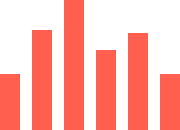

These charts can display exact values, including decimal places.
For instance, if the user is looking to identify the least effective category, sort the values in ascending order.


The total should always add up to 100%.
Composition charts emphasize the whole and its parts rather than comparing individual segments to each other.

This visualizes how often values cluster and occur within ordered numeric intervals (bins). To visualize how values change over time, use a trend chart.
Too many bins can hide the data pattern, while too few bins fail to represent it effectively. Whenever possible, use consistent bin sizes so users can accurately interpret frequency.
There should be enough data to reveal a meaningful shape or curve.
Distribution charts are designed for continuous, numerical ranges. Bins represent ranges of a continuous variable (e.g., score ranges, time ranges, value ranges), not named categories.
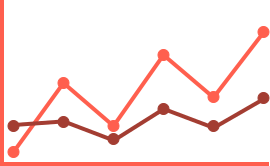
This visualizes how a metric evolves over a continuous, chronological sequence.
Uneven gaps can misleadingly exaggerate or hide the rate of change.
Do not use for non-sequential categorical (nominal data). Use a comparison chart instead.
What is the purpose of your visualization?
What types of data are you working with?
Do categories convey negative or positive connotations?
